Index
Gegevensbeschermingseffectbeoordeling - de wetgeving (korte samenvatting)
Onder de nieuwe privacywetgeving is het in bepaalde omstandigheden verplicht een “gegevensbeschermingseffectbeoordeling” - kortweg “GEB” (of DPIA in het Engels) uit te voeren. Een GEB is een procedure om te evalueren of een verwerking van persoonsgegevens risico’s inhoudt voor de rechten en vrijheden van de persoon wiens data wordt verwerkt en hoe men deze risico’s kan beheersen.
Artikel 35.2 van de GDPR stelt dat een gegevensbeschermingseffectbeoordeling vereist is in de volgende gevallen:
- een systematische en uitgebreide beoordeling van persoonlijke aspecten van natuurlijke personen, die is gebaseerd op geautomatiseerde verwerking, waaronder profilering, en waarop besluiten worden gebaseerd waaraan voor de natuurlijke persoon rechtsgevolgen zijn verbonden of die de natuurlijke persoon op vergelijkbare wijze wezenlijk treffen
- grootschalige verwerking van bijzondere categorieën van persoonsgegevens als bedoeld in artikel 9, lid 1, of van gegevens met betrekking tot strafrechtelijke veroordelingen en strafbare feiten als bedoeld in artikel 10
- stelselmatige en grootschalige monitoring van openbaar toegankelijke ruimten
De WP29 heeft een lijst van een negental factoren opgesteld die helpen om te beoordelen wanneer er een hoog risico is. Hoe meer factoren aanwezig zijn in de verwerking, des te groter de kans dat er sprake is van een hoog verwerkingsrisico. U moet geval per geval beoordelen of het risico hoog en een GEB dus noodzakelijk is. Deze negen criteria zijn:
- Evaluatie of scoretoekenning
- Geautomatiseerde besluitvorming met rechtsgevolg of vergelijkbaar wezenlijk gevolg
- Stelselmatige monitoring
- Gevoelige gegevens of gegevens van zeer persoonlijke aard (Ref. Art. 9 en Art. 10)
- Op grote schaal verwerkte gegevens
- Matching of samenvoeging van datasets
- Gegevens met betrekking tot kwetsbare betrokkenen
- Innovatief gebruik of innovatieve toepassing van nieuwe technologische of organisatorische plossingen
- Wanneer als gevolg van de verwerking zelf "betrokkenen [...] een recht niet kunnen uitoefenen of geen beroep kunnen doen op een dienst of een overeenkomst"
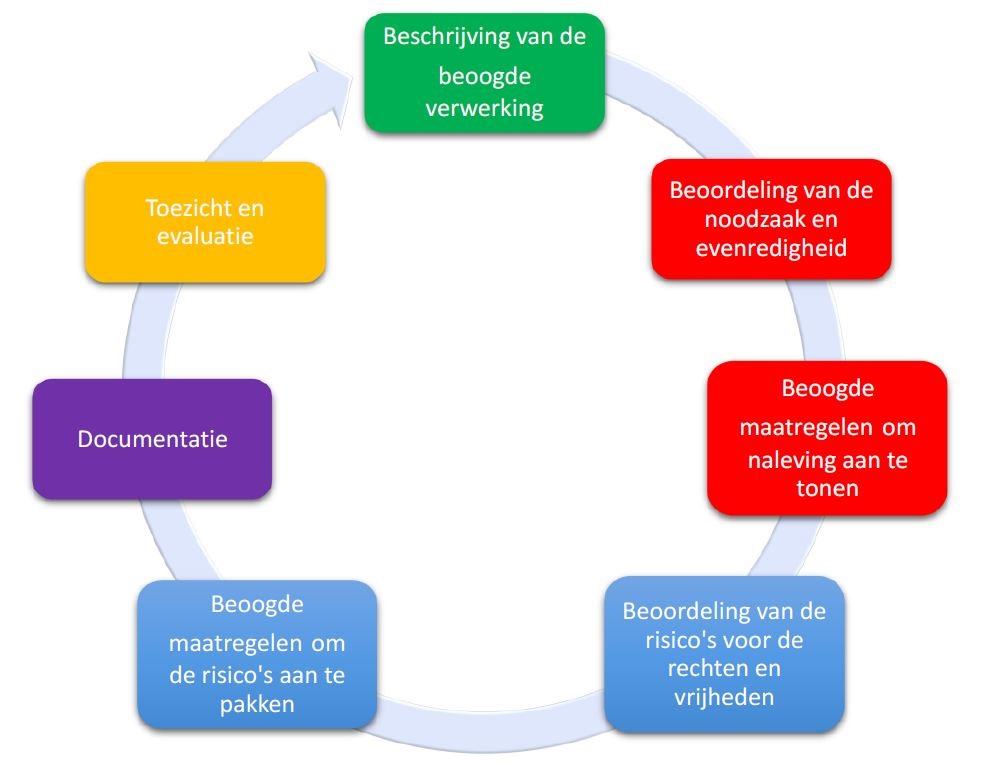
In de AVG zijn de minimale kenmerken van een gegevensbeschermingseffectbeoordeling beschreven (Art.35-7, en de overwegingen 84 en 90):
- een beschrijving van de beoogde verwerkingen en de verwerkingsdoeleinden
- een beoordeling van de noodzaak en de evenredigheid van de verwerkingen
- een beoordeling van de risico's voor de rechten en vrijheden van betrokkenen
- de beoogde maatregelen om
- de risico's aan te pakken
- aan te tonen dat aan deze verordening is voldaan
De volgende figuur illustreert het generische iteratieve proces voor het uitvoeren van een gegevensbeschermingseffectbeoordeling
Een " risico " is een scenario dat een gebeurtenis en de gevolgen ervan beschrijft (in relatie met de rechten en vrijheden van natuurlijke personen), ingeschat in termen van ernst en waarschijnlijkheid. Ernst gaat van kritisch (bv : er is een aanzienlijke, reële schade aan een goot aantal betrokkenen) tot matig (bv klein of procedureel probleem dat niet leidt tot aanzienlijke schade). Waarschijnlijkheid gaat over de kans dat een risico zich voordoet (gaande van waarschijnlijk tot onwaarschijnlijk).
Gegevensbeschermingseffectbeoordeling - de praktijk in Tools4GDPR
Binnen de Tools4GDPR bestaat de mogelijkheid om een eenvoudige voorbereidende analyse te maken voor een gegevensbeschermingseffectbeoordeling (GEB). Het data register laat je toe om een gedetailleerde en duidelijke omschrijving te geven van de verwerkingen en doeleinden. De GEB module laat u toe om weer te geven welke gegevens worden bijgehouden. De combinatie van het register en de lijst van gegevens die je bijhoudt stellen je in staat om een beoordeling van de proportionaliteit van de verwerkingen t.o.v. de doeleinden te maken.
Tevens heb je de mogelijkheid om een beoordeling te maken van de risico's voor de rechten en vrijheden van de betrokkenen en aan te geven welke maatregelen er zijn genomen om deze risico's te beperken.
Verder laat de module toe om aan te geven of je bijzondere categoriën van persoonsgegevens gegevens verwerkt (Art.9, Art.10) en welke uitzonderingsregel je hanteert om deze gegevens toch te verwerken.
Om structuur aan te brengen binnen een GEB worden verschillende niveaus vastgelegd:
-
Elk GEB heeft verschillende Systemen
-
Binnen elk systeem kunnen er verschillende Gegevensgroepen bestaan
- Binnen elk gegevensgroep kunnen er verschillende Gegevens bestaan
-
Binnen elk systeem kunnen er verschillende Gegevensgroepen bestaan
-
Een systeem
Een systeem bestaat uit een samenstel van één of meerdere onderdelen (gegevensgroepen) die samen als geheel een bepaalde functie uitoefenen. Het bijhouden van personeelsgegevens in een papieren dossier kan als een systeem beschouwd worden. Als je diezelfde gegevens ook digitaal bewaard via een software, dan is dat een ander systeem. (Alhoewel beide systemen misschien dezelfde gegevengroepen/gegevens bevatten worden ze als 2 verschillende systemen beschouwd omdat ze beide andere risicofactoren inhouden)
Voor elk systeem kan je aangeven of het systeem een verwerking uitvoert die vallen onder de verwerkingen die een hoog risicogehalte inhouden. Vervolgens kan je bepalen welke risicofacoren er verbonden zijn aan het gebruiken van het systeem en hoe je die inschat.
Elk systeem is onderverdeeld in drie luiken: Beschrijving van het systeem, de verwerkingstypes en de risicobepaling.
-
Beschrijving van het systeem
Volgende gegevens dienen ingevuld en bewaard te worden:
Systeem Naam Naam van het Systeem. Betrokkene Selecteer uit de lijst van Betrokkenen de betrokkenen die past voor dit systeem. Beschrijving Beschrijving van het systeem. Opmerking Je kan een opmerking invullen over dit systeem. Locatie Waar worden de gegevens van dit systeem bewaard. Bescherming Algemene beschrijving hoe de gegevens in dit systeem worden beschermd. -
Verwerkingstypes
Verwerkingtypes geven weer welke types verwerkingen worden uitgevoerd die een hoog risico (kunnen) inhouden. Voor elk systeem kan je verschillende verwerkingstypes toevoegen.
Naam Beschrijving Verwerkingstype Selecteer uit de lijst een verwerkingstype. (Verwerkingstypes kunnen aangemaakt worden via setup van Verwerkingstypes. Opmerking In de opmerking kan je een verduidelijking geven (gedetailleerde beschrijving) over het ingegeven verwerkingstype -
Risicobepaling
Voor de Risicobepaling dient er steeds een combinatie van 3 elementen ingegeven te worden. Je kan meerdere combinaties ingegeven indien dat nodig is voor het gegeven systeem.
Naam Beschrijving Risico Selecteer uit de lijst een risico voor de verwerking. (Risico's kunnen aangemaakt worden via setup van Risico's. Niveau van ernst Selecteer uit de lijst de ernst van het risico op het gegeven systeem. (Niveaus van ernst kunnen aangemaakt worden via setup van Niveaus van ernst. Waarschijnlijkheden Selecteer uit de lijst de waarschijnlijkheid dat een risico zal voorkomen voor het gegeven systeem. (Waarschijnlijkheidsniveaus kunnen aangemaakt worden via setup van Waarschijnlijkheden. Opmerking Hier kan je eventueel een meer uitgebreide omschrijving weergeven in verband met het risico en de genomen acties
-
-
Gegevensgroepen
Een gegevensgroep bestaat uit een verzameling van Gegevens. Tevens behoort een gegevensgroep toe aan een Systeem.
Voor elke gegevensgroep kan je bepalen of de gegevens in de groep behoren tot één van de bijzondere categorie van persoonsgegevens (Art 9 en 10). (Tip: dit is een manier om gegevensgroepen samen te stellen). Indien de groep een bijzondere categorie toegewezen heeft, is het ook noodzakelijk om aan te geven welke Verwerkingsuitzonderingsregel je toepast voor het verwerken van de gegevens toch te laten doorgaan.
Elke gegevensgroep is onderverdeeld in twee luiken: Beschrijving van de gegevensgroep en de bepaling of je met gevoelige gegevens aan het werken bent (bijzondere categorie van gegevens en uitzonderingsregels).
-
Beschrijving van de gegevensgroep
Volgende gegevens dienen ingevuld en bewaard te worden:
Naam Beschrijving Systeem Selecteer uit de lijst het Systeem waartoe deze gegevensgroep behoort. (Systemen kunnen aangemaakt worden via setup van Systemen. Gegevensgroep Naam van de gegevensgroep Beschrijving Beschrijving van de gegevensgroep Opmerking Je kan een opmerking invullen over de gegevensgroep Bewaartermijn Selecteer uit de lijst de algemene bewaartermijn die geldig is voor deze gegevensgroep.(Bewaartermijnen kunnen aangemaakt worden via Set-up van Bewaartermijnen -
Gevoelige gegevens
Gevoelige gegevens geven weer of je bijzondere categorieën gegevens verwerkt, en welke uitzonderingssituaties daartegenover staan.
Voor de gevoelige gegevens sectie dient er steeds een combinatie van 3 elementen ingegeven te worden. Je kan meerdere combinaties ingegeven indien dat nodig is voor de gegeven gegevensgroep.
Naam Beschrijving Bijzondere Categoriën Selecteer uit de lijst een Bijzondere Categoriën. (Bijzondere Categoriën kunnen aangemaakt worden via setup van Bijzondere Categoriën. Uitzonderingsregel Selecteer uit de lijst een Verwerking Uitzonderingsregels. (Verwerking Uitzonderingsregels kunnen aangemaakt worden via setup van Verwerking Uitzonderingsregels. Opmerking In de opmerking kan je een verduidelijking geven (gedetailleerde beschrijving) over de bijzondere categorie gegevens en/of de uitzonderingsregel
-
-
Gegevens
Een gegeven is de beschrijving van het specifieke gegeven dat wordt verwerkt. Voorbeelden van gegevens zijn: Naam, Voornaam, Salaris, Bankrekeningnummer, ... Het gaat hier NIET over de inhoud van het gegeven, maar van de beschrijving van het gegeven dat wordt bijgehouden of verwerkt.
Gegevens worden gegroepeerd in Gegevensgroepen.
-
Beschrijving van de gegevens
Volgende gegevens dienen ingevuld en bewaard te worden:
Naam Beschrijving Gegevensgroep Selecteer uit de lijst de Gegevensgroepen waartoe dit veld behoort. (Gegevensgroepen kunnen aangemaakt worden via Set-up van Gegevensgroepen Gegevensnaam Naam van het gegeven Beschrijving Beschrijving van het gegeven Opmerking Je kan een opmerking invullen over het gegeven Bewaartermijn Selecteer uit de lijst de algemene bewaartermijn die geldig is voor deze gegevensgroep.(Bewaartermijnen kunnen aangemaakt worden via Set-up van Bewaartermijnen. Start Datum Start datum sinds je deze gegevens verwerkt Eind Datum Datum sinds wanneer je deze gegevens niet langer verwerkt Gevoelige gegevens Vink aan indien deze gegevensgroep gevoelige gegevens bevat
-
-
Toegang tot de gegevens
Toegang tot de gegevens laat je toe om aan te geven welke gebruikersgroepen of specifieke gebruikers Toegang tot de gegevens hebben tot welke gegevensgroepen en/of specifieke gegevens.
Gebruikersgroepen en gebruikers kunnen aangemaakt worden via de setup.
Om specifieke gebruikersgroepen of systemen te selecteren kan je een filter zetten. Je kiest één of meerder gebruikersgroepen en/of één of meerdere systemen. Door op de knop "Filter" te drukken, worden enkel de gegevens getoond die je hebt uitgefilterd. Om terug alle gegevens te zien, klik je onder beide groepen de "All" knoppen.
Om aan te duiden welke gebruikersgroep of gebruiker toegang heeft tot welke gegevensgroepen of gegevens dien je het respectievelijke vankje aan te vinken.
Gegevensbeschermingseffectbeoordeling - Set-up tabellen
-
Risico Types
Risico Types zijn een manier om Risico's te groeperen. Verschillende Risico's kunnen gegroepeerd worden per Risico Type. Bij de instalatie van het programma wordt een indicatieve lijst meegegeven waarin enkele Risico Types zijn in opgenomen. Let op: deze lijst dekt evenwel niet alle situaties. Je kan deze lijst ook wijzigen, of zelf Risico Types toevoegen of verwijderen.
Naam Beschrijving Risico Type Naam van het Risico Type Beschrijving Beschrijving van het Risico Type Risicos
Bij de instalatie van het programma wordt een indicatieve lijst meegegeven waarin enkele Risico's zijn in opgenomen. Let op: deze lijst dekt evenwel niet alle situaties. Je kan deze lijst ook wijzigen, of zelf Risico's toevoegen of verwijderen.
Naam Beschrijving Risico Type Selecteer uit de lijst van Risico Types het Type dat past voor het risico die je wil ingeven. (Risico Types kunnen aangemaakt worden via setup van Risico Types). Risico Naam van het Risico Beschrijving Beschrijving van het Risico Niveaus van ernst
Naam Beschrijving Niveau van ernst naam Naam van Niveau van ersnst Beschrijving Beschrijving van het Niveau van ernst Waarschijnlijkheden
Naam Beschrijving Waarschijnlijkheid Naam van de Waarschijnlijkheid Beschrijving Beschrijving van de waarschijnlijkheid Verwerkingstypes
Verwerkingtypes geven weer welke types verwerkingen worden uitgevoerd die een hoog risico (kunnen) inhouden. Bij de instalatie van het programma wordt een indicatieve lijst meegegeven waarin enkele Risico's zijn in opgenomen. Let op: deze lijst is gebaseerd op de initiele lijst in WP29. Je kan deze lijst ook wijzigen, of zelf Verwerkingstypes toevoegen of verwijderen.
Naam Beschrijving Verwerkingstype Naam van het Verwerkingstype Beschrijving Beschrijving van het verwerkingstype Bijzondere Categorie Types
Bijzondere Categorie Types zijn een manier om een Bijzondere Categoriën van persoonsgegevens te groeperen. Zie Bijzondere Categoriën).
Naam Beschrijving Bijzonder Categorie Type Naam van het Bijzonder Categorie Type Beschrijving Beschrijving van Bijzonder Categorie Type Bijzondere Categorieën
Bijzondere Categoriën van persoonsgegevens (Art 9 en 10) zijn persoonsegevens die niet mogen verwerkt worden tenzij er een verwerking uitzonderingsregel van kracht is. Bij de instalatie van het programma wordt een lijst meegegeven waarin de Bijzondere Categoriën zijn in opgenomen. Let op: deze lijst is gebaseerd op de initiele lijst in Art.9 en 10. Je kan deze lijst ook wijzigen, of zelf Bijzondere Categoriën toevoegen of verwijderen.
Naam Beschrijving Bijzonder Categorie Type Selecteer uit de lijst van Bijzonder Categorie Types het Type dat past voor de Bijzondere Categorie je wil ingeven. (Bijzondere Categorie Types kunnen aangemaakt worden via setup van Bijzondere Categorie Types). Bijzondere Categorie Naam van de Bijzondere Categorie Beschrijving Beschrijving van de Bijzondere Categorie Verwerkingsuitzonderingsregel
Uitzonderingsregels geven aan of bijzonder categoriën van gegevens mogen verwerkt worden. Bij de instalatie van het programma wordt een lijst meegegeven waarin de Verwerking Uitzonderingsregels zijn in opgenomen. Let op: deze lijst is gebaseerd op de initiele lijst in Art.9. Je kan deze lijst ook wijzigen, of zelf Uitzonderingsregels toevoegen of verwijderen.
Naam Beschrijving Verwerkingsuitzonderingsregel Naam van de Verwerkingsuitzonderingsregel Beschrijving Beschrijving van de Verwerkingsuitzonderingsregel Gebruikersgroepen
Gebruikersgroepen zijn een manier om Gebruikers te groeperen.
Naam Beschrijving Naam van de groep Naam van de gebruikersgroep Beschrijving Beschrijving van de gebruikersgroep Gebruikers
Het is niet de bedoeling om namen van gebruikers toe te voegen, maar eerder functies die toegang tot de gegevens hebben.
Naam Beschrijving Gebruikersgroep Selecteer uit de lijst van Gebruikersgroepen de groep waartoe de gebruiker behoort. (Gebruikersgroepen kunnen aangemaakt worden via setup van Gebruikersgroepen). Gebruiker Naam van de gebruiker (functie) Beschrijving Beschrijving van de gebruiker (functie) Start Datum Start datum van de gebruiker Stop datum Stop datum van de gebruiker